
Overview of Integration
We have partnered with BambooHR to deliver the Connect (ATSi Apply) solution, enabling jobseekers to apply seamlessly for roles advertised on Stepstone Group job boards. All applications are transmitted directly to BambooHR, with the application source clearly identified.
How does this work?
Connect is a free to use technology that creates a seamless integration between our Stepstone Group job boards and BambooHR. Once integrated, applicant data and CVs are automatically transferred into your BambooHR system.
This integration streamlines the application process by eliminating the need for candidates to re-enter their information on an external application form. Screening questions and additional requirements are pulled directly from the BambooHR careers site and presented to candidates as part of the application process on our platform.
As a result, application completion rates increase significantly, while candidate drop-off throughout the application journey is greatly reduced.
What are the capabilities?
This integration is ONLY available for those customers who are using NO application questions or additional questions, or the exact SAME questions for ALL jobs.
We will hardcode all questions on our side during set-up.
If you customise the questions depending on the job, then unfortunately we can’t support this and are unable to offer the integration.
Please speak to your Stepstone representative if you’d like to discuss further.
Requirements
To activate Connect, clients are required to provide the following information:
- companyDomain name, see URL https://{companyDomain}.bamboohr.com/
- API Key value
- List of application questions and additional questions (if needed)
- Privacy policy (optional)
Please send the above information to one of the following contacts, depending on your job board:
| Country | Job Board | Contact Email Address |
| Continental Europe | Stepstone DE | connect@stepstone.com |
| UK | Totaljobs / Caterer | connectuk@thestepstonegroup.com |
| Ireland | Irishjobs, Jobs.ie, NIJobs | connectuk@thestepstonegroup.com |
Once we have received the above information, we will proceed with testing.
Steps to integrate and enable
Step 1: Obtaining The API Key
1. Log into your BambooHR portal
2. Go to My Account (bottom-left corner) → API Keys
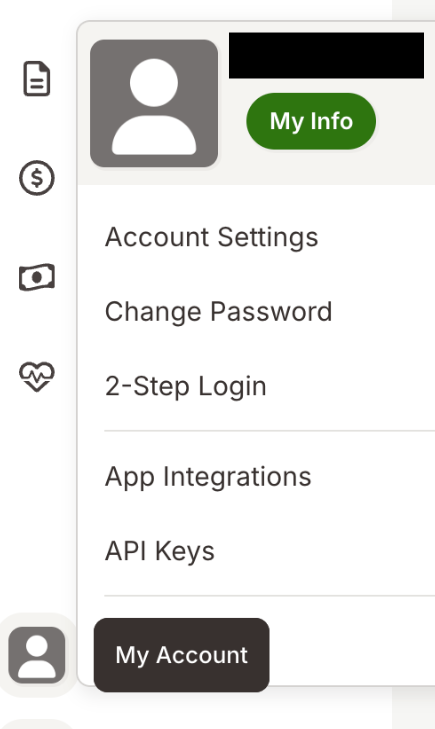
 3. Press Add New Key
4. Enter any name of the Key, for example, Stepstone
5. Save the Key value
Step 2: Sharing Application Questions and Additional Questions
Please share all application questions and additional questions that you have set in BambooHR for your roles. (If you haven’t set any then you can skip Step 2).
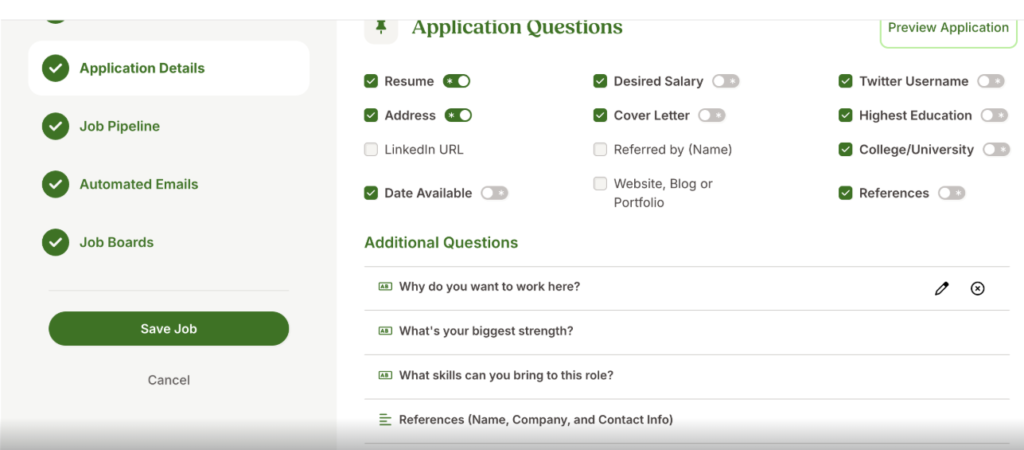
Please remember: these MUST be the same for every job you will be posting. We unfortunately cannot support different questions for different jobs.
Step 3: Privacy Policy
Stepstone Connect can display a clickable link to candidates to allow them to view the Privacy Policy before they submit their application. This will also make them aware that by applying for this job they consent to the displayed policy.
To enable this, we require the following:
- URL to your Privacy Policy or Terms & Conditions.
- Company name to display beside your Privacy Policy or Terms & Conditions.
If you do not share a Privacy Policy URL, we will show a generic message to all candidates instead.
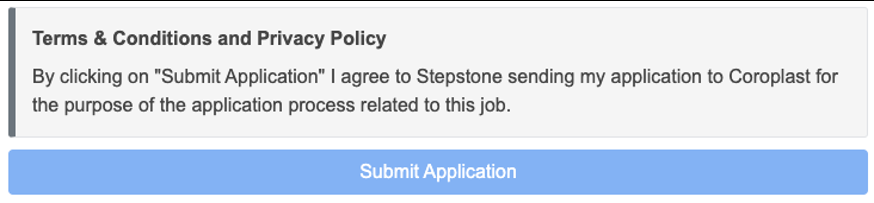
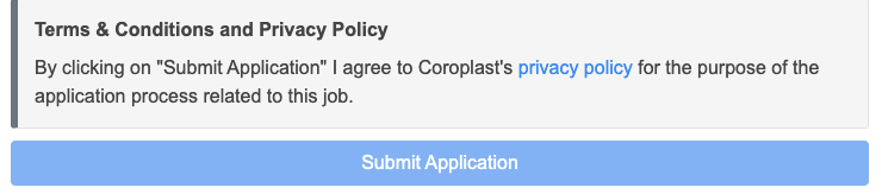
Please keep this information to hand to send with the other required information.
Testing Process
End-to-end Test
Once we have the necessary information from the requirements above, we will follow the steps below:
- Configure the integration within our internal system.
- Set up a test job, using the job requisition URL provided.
- This will be set up on a test account and not use your account credits.
- Apply for the job as a candidate.
- Test the questions we hardcoded (if necessary) are showing correctly.
- Send an application into BambooHR.
- Advise application has been sent and ask you to confirm that the application and source has come through as expected.
Considerations:
- If we have any issues throughout this process, we will feedback to you in the first instance.
Go Live
Once testing has been completed in all tenants, we will await your confirmation to go live with the integration.
At this point, we will turn this on for all live jobs on your account.